Why Accessories Matter for Portable Mecha Fans
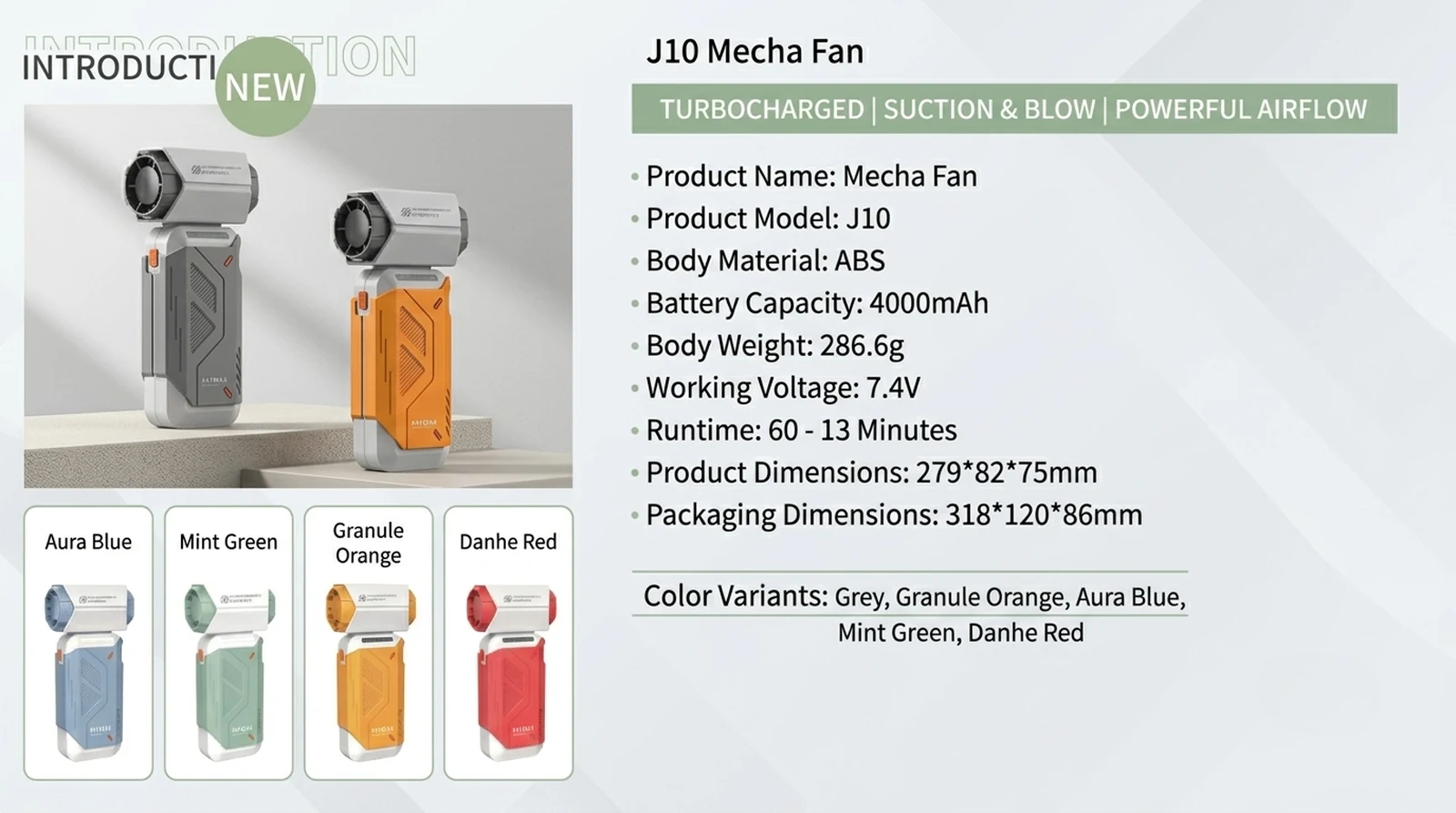
Portable mecha fans have moved past the novelty-gadget phase and into a real category of personal cooling gear. Once you've picked a unit — whether it's a compact wearable or a desk-sized model like the J10 Mecha Fan — the next decision is which accessories actually improve the experience and which are pure upsell.
This guide walks through the four most useful accessory categories — lanyards, mounts, cases, and charging gear — and ends with a frank breakdown of what's worth buying and what you can skip.
1. Carry Lanyards: Comfort and Safety
What a lanyard actually does
A carry lanyard is not just a strap. On a portable fan, it serves three distinct roles:
- Tethering — keeps the device from falling if your grip slips, especially on stairs, escalators, or crowded transit
- Weight distribution — moves the load from your hand or wrist to your neck or shoulder, which matters for units over 300 g
- Quick access — lets the fan hang at chest or waist height, ready to grab and aim in one motion
Materials to consider
- Nylon webbing — durable, low-stretch, and easy to clean. The workhorse choice for daily commuters.
- Braided paracord — softer on bare skin and more forgiving on the neck, but can fray after heavy use.
- Silicone or TPU-coated straps — resist sweat and humidity, ideal for outdoor, gym, or kitchen use.
- Woven cotton — comfortable but absorbs moisture; not the best choice in hot, sweaty conditions.
Length, width, and adjustability
Look for lanyards in the 45–65 cm range with a sliding adjuster. Fixed-length straps either dangle too low or ride too high to be useful. A quality adjuster also lets you shorten the strap so the fan sits at sternum level when worn around the neck — a more comfortable position for sustained use.
Width is underrated. Anything under 8 mm will dig into the neck over long sessions. The comfort sweet spot is 12–15 mm, especially if the fan weighs more than 250 g.
Safety details that get overlooked
- Breakaway clasps — essential if the fan gets caught on something while walking, cycling, or leaning over a workstation
- Reinforced stitching at stress points — the join between the strap and the attachment loop is the most common failure point on cheap lanyards
- Attachment hardware — carabiner-style clips are easy to swap between fans; sewn loops are more secure but lock you into one device
- Reflective elements — a small touch, but useful for anyone walking near traffic in low light
When a lanyard is overkill
If you only use the fan at a desk or on a nightstand, a lanyard is wasted hardware. The argument for a lanyard is strongest when you're moving: commuting, walking, attending outdoor events, or working in a warehouse, kitchen, or lab.
2. Desk Clamps and Tripods for Hands-Free Use
Why hands-free is the real upgrade
Handheld fans have a ceiling. Holding a device at face level for more than ten minutes becomes uncomfortable, and the airflow angle drifts as your arm tires. A mount solves both problems at once.
Desk clamps
A desk clamp is a C-shaped bracket that attaches to the edge of a table, shelf, or monitor arm. The fan mounts on a short arm or ball joint, letting you direct airflow precisely.
What to look for:
- Clamp opening range — measure your desk edge or shelf thickness first. Most clamps fit 10–60 mm, but specialty mounts reach 80 mm
- Padding on the contact surface — protects wood finishes and prevents slippage
- Ball joint or pivot head — a single pivot point is more flexible than a fixed-angle arm
- Weight rating — a typical mecha fan weighs 200–500 g; choose a clamp rated comfortably above that
- Cable management — some clamps include a small channel or clip for the charging cable, which keeps the desk tidy
Tripods and mini-stands
A tabletop tripod is the simpler alternative. It sits on a flat surface with three short legs and a mounting screw or clamp on top. It is useful for:
- Streaming or video calls where the fan must stay out of frame
- Camping, picnics, and outdoor dining
- Workbench use in garages, studios, or repair benches
The trade-off is stability. Tripods are stable only on flat surfaces, and cheap ones wobble under even modest weight. A clamp-mounted arm gives you more placement flexibility, especially for odd desk geometries or shelves without a usable edge.
Magnetic mounts
Some fans integrate a magnetic plate on the back, which lets you snap the fan to any ferrous surface — tool cabinets, filing shelves, whiteboards with metal backing, or the side of a refrigerator. Magnets are convenient, but check the pull strength. A weak magnet (rated under about 2 kg) will let the fan slide on vertical surfaces over time.
3. Hard Cases for Travel
When a case earns its keep
A hard case is worth the investment if any of the following apply:
- You fly or take trains regularly with the fan
- You carry the fan in a backpack alongside keys, chargers, or tools
- The fan has detachable blades, grills, or nozzles that can shift in transit
- You live in a humid or dusty environment where particle ingress is a real concern
- You store the fan long-term and want to keep the finish and grills clean
Shell material options
- EVA semi-hard cases — the most common choice. Light, shock-absorbent, and water-resistant. A good all-round option for most users.
- Molded ABS or polycarbonate — stiffer and more protective, but heavier and bulkier. Worth it for checked luggage or long-haul travel.
- Soft zippered pouches — cheaper, but offer minimal crush protection. Only suitable if the fan is already built like a tank.
Interior layout that actually works
A useful travel case has:
- A mesh pocket for the charging cable and any small attachments
- A cutout or strap that holds the fan in place so it doesn't rattle
- Reinforced zipper pulls — the most common hardware failure on cheap cases
- A carrying handle or D-ring for clipping to a larger bag
- Soft lining — flannel or microfiber interiors prevent the fan's finish from getting micro-scratches
Sizing warning
Generic "fits all" cases often leave the fan loose, which is almost as bad as no case at all — the fan will rattle against the shell the moment you set the bag down. Look for either a custom-fit case from the fan's manufacturer or a universal case with adjustable foam inserts. A fan sliding around inside its case will see the same impact damage it would have seen unprotected.
4. Fast Chargers and Power Banks
Understanding the charging spec
Most modern mecha fans charge via USB-C, with a small number still using Micro-USB or proprietary magnetic pogo-pin connectors. The relevant numbers on the charger side are:
- Wattage — typical fans accept anywhere from 5 W to 18 W. Higher-wattage chargers are safe but won't speed up charging beyond the fan's own limit.
- Voltage and current negotiation — USB-PD (Power Delivery) and QC (Quick Charge) are the two most common fast-charge protocols. Check the fan's spec sheet to see which one it supports, if any.
Practical charging scenarios
- At the desk — a 20–30 W GaN charger with USB-C is enough for any fan and frees up outlets for your phone or laptop
- In the car — a dual-port car charger lets you charge the fan and phone simultaneously on long drives
- On the trail or at a campsite — a 10,000 mAh power bank will fully recharge a typical fan three to five times. For a full weekend away, step up to 20,000 mAh
- At events, festivals, or trade shows — a slim 5,000 mAh card-sized power bank is enough for one full recharge and weighs almost nothing
Cable quality
The cable is the part most buyers under-invest in. Look for:
- USB-C to USB-C for fans that support PD fast charging
- E-marked cables if you're using chargers above 60 W (overkill for fans, but a good standard to follow)
- Braided or reinforced jackets — bare PVC cables fray quickly when coiled in a bag
- 0.5–1 m length for portable use; 1.5–2 m for desk use
- Right-angle connectors — handy when the fan sits on a desk and you want the cable to run flat along the surface
Wireless charging
A small number of mecha fans support Qi wireless charging. It is a nice convenience feature, but slower than wired charging by a factor of two to three. Treat it as a desk-top "drop and go" feature, not a primary charging method, and only consider it if you already own a Qi pad.
5. Accessories That Are Worth It vs Unnecessary
After covering the four major categories, here is a frank summary.
Worth the spend
- Adjustable lanyard with a breakaway clasp — if you carry the fan daily
- Padded desk clamp with a ball joint — for desk, workbench, or bedside use
- EVA hard case — for anyone who travels with the fan or carries it in a packed bag
- GaN USB-C charger (20–30 W) — replaces multiple slow chargers and works across devices
- Quality 1 m USB-C cable — the cheapest upgrade with the biggest quality-of-life impact
- 10,000 mAh power bank — for travel, events, or unreliable power situations
Skip it
- Decorative charms or stickers — they look fun but add weight and snag risk
- Multiple-length cable bundles — one good cable covers most needs
- Cheap "universal" cases with no inserts — give false confidence
- Wireless charging pads for fans that don't support Qi — pure waste
- Mini tripods rated under 500 g — wobble, collapse, and end up in a drawer
How to prioritize if budget is tight
Buy in this order:
- A good lanyard (safety first)
- A desk clamp or tripod (daily comfort)
- A 20–30 W GaN charger and one good USB-C cable
- A hard case, once you start traveling with the fan
Power banks move up the list if you use the fan outdoors for extended sessions, and the case moves up if the fan is ever going into a checked bag.
6. Frequently Asked Questions
Do mecha fans come with accessories in the box?
Most units ship with a charging cable and a basic wrist strap or short lanyard. Higher-tier kits sometimes include a case, a stand, or an extra battery. Always check the in-box contents list before buying, because "accessories" in product listings sometimes refers to optional add-ons sold separately rather than items included in the default package.
Can I use any USB-C charger with a mecha fan?
In almost all cases, yes. USB-C chargers negotiate voltage and current automatically, so a 5 W phone charger and a 65 W laptop charger will both work. The fan will simply draw only as much power as it can accept. Fast-charge speeds require a charger that supports the same protocol the fan uses — usually USB-PD or QC — and a cable rated for the current involved.
How do I clean a mecha fan without damaging it?
Power the fan off and disconnect any cables. Use a soft brush or short bursts of compressed air to clear dust from the intake grills and blade area. For sticky residue, lightly dampen a microfiber cloth with isopropyl alcohol and wipe the exterior. Avoid spraying cleaners directly into the motor housing. If the front grill is removable, take it off and clean it under running water, but make sure it is fully dry before reinstalling to prevent moisture from reaching the motor.
Are mecha fan accessories universal, or do I need brand-specific ones?
It depends on the accessory. Charging cables and USB-C chargers are universal. Lanyards, clamps, and cases are usually universal as well, though a snug fit depends on the fan's dimensions and weight. The only category that often requires brand-specific gear is replacement batteries or proprietary charging docks, where the connector or cell format is unique to a product line.
This is an independent editorial content site. For product specifications and OEM/ODM inquiries, visit Xinmeili Technology.
Continue exploring